
Davinci Resolve Titles Review 2026: Is the Megapack Bundle Worth It?

Disclosure: Hnlsharing is reader-supported. When you buy through links on our site, we may earn an affiliate commission at no extra cost to you. This does not change our verdicts.

I edit on DaVinci Resolve because the free version is genuinely capable, but the built-in title templates are the one place the software still feels bare next to Premiere or After Effects presets. That’s what sent me looking at Davinci Resolve Titles, a template store built specifically for Resolve’s Fusion page. I went through their bundle offerings and template mechanics directly to see if they’re worth the money.
The short answer
Davinci Resolve Titles is a legitimate template marketplace built specifically for DaVinci Resolve’s Fusion-based title, transition, and effects system, and its biggest value play is the Megapack Bundle, which bundles the catalog at a real markdown from $187.99 down to $87.99 — a $100 saving verified directly on the storefront.
What is Davinci Resolve Titles
Davinci Resolve Titles sells drag-and-drop template packs — titles, transitions, lower thirds, intros, and effects — built as native Fusion macros/templates for DaVinci Resolve, rather than generic overlays you have to key and composite yourself. That distinction matters: Resolve’s Fusion page has a steep learning curve, and templates built specifically for it drop straight into the Edit page’s Effects Library without extra setup. The catalog is organized into individual theme packs (things like glitch title packs, cinematic lower thirds, social-media-format intros) plus the all-in-one Megapack Bundle that rolls the whole library into one purchase.
Product deep-dive: The Megapack Bundle
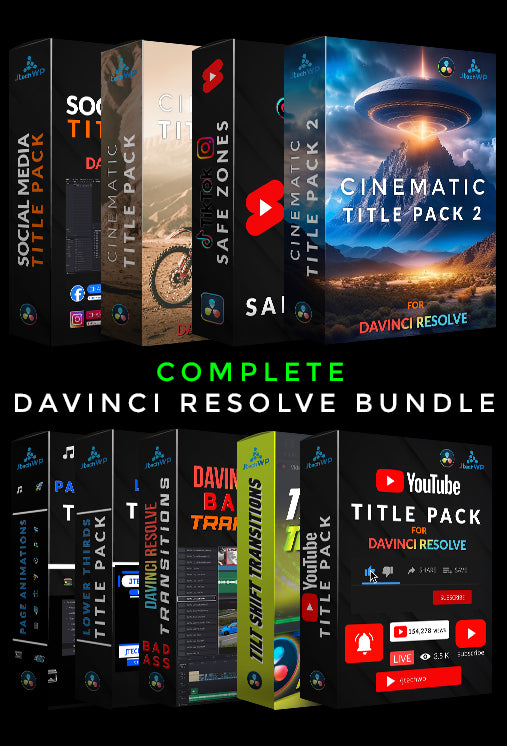
The Megapack Bundle is the brand’s flagship offer: instead of buying individual title packs one at a time, it bundles the full current catalog into a single download for $87.99, marked down from a $187.99 list price — a straightforward $100 discount rather than a vague “up to X% off” claim. For anyone who edits regularly in Resolve and wants a title library they don’t have to keep re-buying pack by pack, the bundle math works out considerably cheaper than piecing the catalog together individually.
| Product | Price | Notes |
|---|---|---|
| Megapack Bundle | $87.99 |
Full current template catalog, one-time purchase |
| Individual theme packs | Varies per pack | Titles/transitions/lower-thirds sold separately |
Templates are delivered as downloadable files designed to drop into Resolve’s Fusion Templates / Effects Library folder, after which they show up alongside Resolve’s native effects for drag-and-drop use on the timeline — no manual Fusion node-building required, which is the entire point for editors who want the polish without the Fusion learning curve.
What’s actually inside the Megapack Bundle
We checked the product page directly on 22 September 2026 to confirm exactly what’s included, since “every pack” is a vague claim on its own:
- YouTube Title Pack
- Safe Zones Pack
- Social Media Title Pack
- Cinematic Titles 1
- Cinematic Pack 2
- Lower Thirds Title Pack
- Page Icons Animation
- Bad Ass Transitions
- Tilt Shift Transitions
Compatibility: the brand states the packs work with DaVinci Resolve Free and Studio from version 18 onwards, on Windows, Mac, and Linux — but not on iPad. Templates are built on Resolve’s Fusion page, which explains why Resolve Free (which includes Fusion) can run most of them without needing Resolve Studio.
Fonts: the brand states every font used in the packs is a Google Font, which Google licenses for commercial use, including inside a product you sell — the specific license varies by font (most commonly the SIL Open Font License, with some under the Apache or Ubuntu Font License).
Reviews: the storefront displayed an aggregate of 253 customer reviews across its products at the time of our check; we saw named reviews referencing specific packs (including the Megapack and Safe Zones Pack) dated from mid-2025 through mid-2026, which suggests an active, ongoing customer base rather than a handful of seeded reviews — though we can’t independently verify individual review authenticity.
The storefront also sells the individual packs separately for buyers who only need one style — the YouTube Title Pack, Cinematic Pack 2, Lower Thirds Title Pack, and Page Animations Pack each have their own product pages alongside bundle collections for Transitions and Social Media. If you only need one style of title rather than the full toolkit, know that the individual packs are sold separately at their own prices — the Megapack only makes sense once you know you’ll use more than two or three of the included packs. The site positions itself as “made by an editor, for editors,” and also publishes free resources unrelated to the paid packs, including a free title pack, a DJI Mini 3 Pro node tree for color grading, and free Resolve project files — useful if you want to see the brand’s editing style before spending money.
The brand also runs its own affiliate program through UpPromote, which is a small additional signal it operates as an ongoing business rather than a one-off asset drop.
Pros and cons
Pros
- Built specifically for DaVinci Resolve’s Fusion engine, not repurposed generic overlays
- Megapack Bundle is a real, verifiable discount ($100 off) rather than a vague percentage claim
- One-time purchase model, not a subscription
- Drag-and-drop workflow once installed — no Fusion node editing needed
Cons
- Templates are Resolve-specific — no value if you edit primarily in Premiere or Final Cut
- No sitewide percentage-off code currently active; the bundle itself is the main discount mechanism
- Installing Fusion templates correctly still requires following the brand’s setup instructions the first time
Pricing and how to save
The clearest way to save at Davinci Resolve Titles right now is the Megapack Bundle itself — $87.99 instead of buying the catalog piecemeal, a verified $100 reduction from the $187.99 list price. We check this store’s offers regularly; see our Davinci Resolve Titles store page for whatever’s currently live if new codes appear.
Ready to buy from Davinci Resolve Titles? Megapack Bundle at $87.99 (save $100) — offer tracked on our store page, checked 22 Sep 2026.
Who should buy Davinci Resolve Titles
This is a good fit if you edit regularly in DaVinci Resolve and want polished titles/transitions without spending hours in the Fusion page building them from scratch — YouTubers, wedding/event editors, and social content creators are the most obvious fits. If you don’t use Resolve, or you only need one or two title styles for a single project, the Megapack Bundle’s value drops since you’re paying for a full catalog you won’t fully use.
Who should skip it
Skip the Megapack if you edit primarily on iPad — the brand states its packs are not compatible with DaVinci Resolve for iPad. Skip it too if you’re not sure the drag-and-drop Fusion template style fits your workflow, since the refund policy is explicit that digital purchases are final; download the free title pack first and test it in your own project before paying for the bundle. And if you install the pack and the “Effects Library” entry doesn’t show up, treat that as a first troubleshooting step rather than a defect — Fusion templates only appear after they’re copied into the exact folder DaVinci Resolve expects for your operating system, and a Resolve restart is usually required.
Final verdict
Davinci Resolve Titles delivers what it promises: Fusion-native templates that actually drop into Resolve’s workflow, plus a Megapack Bundle that’s a genuine $100 discount rather than marketing fluff. It’s a narrow niche product — Resolve editors only — but it does that niche well.
Delivery and refund policy at Davinci Resolve Titles
We read the brand’s Refund and Shipping policy pages directly (checked 22 September 2026), since this is a digital-download store and the terms are different from a physical-goods purchase.
Delivery: There’s nothing to ship. The product page states files are delivered the moment you check out, and the storefront promises lifetime access to what you buy.
Refunds: The refund policy page is blunt about this — it states plainly that these are digital products and the store does not offer refunds. That makes the free title pack worth downloading and testing in your own Resolve project before you buy the Megapack, since there’s no return path if the templates don’t fit your workflow.
Frequently asked questions
Is Davinci Resolve Titles an official Blackmagic Design product?
No. Davinci Resolve Titles is an independent third-party template marketplace built for DaVinci Resolve; it is not affiliated with Blackmagic Design, the maker of Resolve.
How much does the Megapack Bundle cost?
The Megapack Bundle is $87.99, marked down from a $187.99 list price — a $100 saving, verified directly on the storefront.
Do the templates work with the free version of DaVinci Resolve?
The templates are built on Resolve’s Fusion page, which is included in the free version of DaVinci Resolve, so most templates should work without needing Resolve Studio — check individual product pages for any Studio-only exceptions.
Is there a discount code for Davinci Resolve Titles?
We did not find an active sitewide percentage-off code at the time of our check; the Megapack Bundle itself is the store’s primary verified discount. Check our store page for any new codes.
How do I install the templates in Resolve?
Templates download as files you place in Resolve’s Fusion Templates / Effects Library folder, after which they appear in the Effects Library for drag-and-drop use on your timeline. Follow the brand’s included setup instructions for your OS the first time.
What’s included in the Megapack Bundle?
Per the product page: YouTube Title Pack, Safe Zones Pack, Social Media Title Pack, Cinematic Titles 1, Cinematic Pack 2, Lower Thirds Title Pack, Page Icons Animation, Bad Ass Transitions, and Tilt Shift Transitions — nine packs in one download.
What is Davinci Resolve Titles’ refund policy?
The brand states plainly on its Refund Policy page that these are digital products and it does not offer refunds. Download the free title pack and test it in your own Resolve project before buying.
Read next
The bottom line
If you edit in DaVinci Resolve and want a real title/transition library without the Fusion learning curve, the Megapack Bundle’s verified $100 discount makes Davinci Resolve Titles worth a look.
